 Half Stop
Guide
How to send a Fujifilm recipe to the X100VI over Bluetooth
The X100VI can take a recipe straight from your iPhone, with no cable. You pair the camera with Half Stop once; after that, putting a recipe in one of its custom slots takes about half a minute. This guide covers pairing, sending, what Bluetooth can and can't do yet, and what to try when it won't connect.
Before you start · Pair once · Send a recipe · Bluetooth or cable? · When it doesn't work · Other cameras
Before you start
- An X100VI. It's the camera Half Stop has been tested on over Bluetooth. Every other supported camera works over a USB-C cable for now.
- Half Stop on your iPhone, with a recipe saved: one from an Instagram post, or one from Discover.
- Fujifilm XApp closed, along with any other camera app. The camera talks to one app at a time over Bluetooth, so a connected XApp blocks Half Stop.
Pair once
- On the camera, press MENU and open Network/USB Setting › Bluetooth/Smartphone Setting › Pairing Registration.
- In Half Stop, open the You tab, tap the gear, then Bluetooth, and tap Pair.
- Allow the pairing on your iPhone, and on the camera if it asks. Half Stop says when the camera is paired.
You only do this once. Next time, switch the camera on and send.
Send a recipe
1. Open the recipe and tap Send to camera
With the cable unplugged, Half Stop offers to send over Bluetooth. If it asks you to pair instead, the camera isn't paired yet: go back to Pair once.
2. Pick a slot and send
Choose a custom slot from C1 to C7. Keep the camera close, switched on and on its shooting screen, with no menu open. Half Stop connects, reads the camera's current settings, writes the recipe into the slot you picked and checks it, which takes about 30 seconds. Only that slot changes.
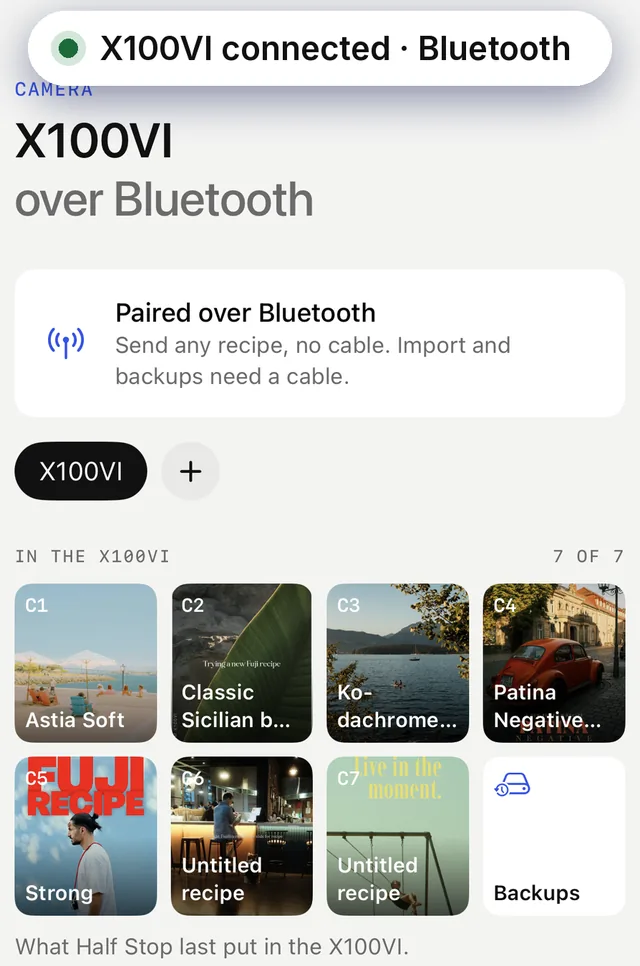
3. Check the Sent page
Half Stop reads the slot back and lists anything the camera didn't take, so you can set it in the menu. Changed your mind? Put back restores what was in the slot before.
4. Shoot with it
Pick the slot from the Q menu, or with Select Custom Setting in the Image Quality menu. Set ISO and exposure compensation on the dials: custom slots don't store them, so Half Stop shows the recipe's suggestions after sending.
Bluetooth or cable?
Both put the recipe in the slot and read it back. The differences, for now:
- Bluetooth needs no cable and no change to the camera's connection mode. Three settings aren't sent this way yet: monochrome tint (the warm/cool and magenta/green shift on Acros and Monochrome), D-Range Priority and custom white balance. When a recipe uses one, the Sent page lists it so you can set it by hand.
- A USB-C cable sends every setting, and is also what you need to import what's already in your slots and to back them up. Use a cable that carries data, with the camera set to Network/USB Setting › Connection Setting › PC Connection Mode › USB RAW CONV./BACKUP RESTORE.
When it doesn't work
- Half Stop can't find or connect to the camera
- Close Fujifilm XApp and any other camera app, including in the iPhone's app switcher. Check that the camera's Bluetooth is on (Network/USB Setting › Bluetooth/Smartphone Setting), that it's on its shooting screen with no menu open, and that it's close to your iPhone.
- Half Stop says the camera has forgotten this phone
- On your iPhone, go to Settings › Bluetooth, tap your camera and choose Forget This Device. Then pair again from Half Stop.
- A setting didn't go in
- The Sent page lists it. Over Bluetooth that's usually monochrome tint, D-Range Priority or custom white balance; set it in the camera's menu, or send the recipe over the cable.
- Importing my slots or backing up doesn't offer Bluetooth
- Those need the cable for now. Sending works over both.
More answers are in the FAQ.
Other cameras
Bluetooth sending for other cameras is being tested, and the Cameras page is updated as each one is confirmed. Until then, X-Trans IV, X-Trans V and recent GFX bodies take recipes over a USB-C cable, and any camera can follow a recipe's checklist by hand. New to recipes? Start with how to save a Fujifilm recipe from Instagram.
Get Half Stop
Save recipes from Instagram and send them to your camera, free to start, with a 7-day free trial of Pro. For iPhone.


Half Stop is not made or endorsed by Fujifilm, and is not affiliated with Fujifilm or Instagram. Connecting a camera to an unofficial app is at your own risk. Fujifilm, X100VI and film simulation names are trademarks of FUJIFILM Corporation.